
Size your BESS project on real market data
BESSview finds the battery size and revenue a site can support: standalone, or co-located behind the meter with solar, wind and your own consumption. Every scenario is simulated and backtested per quarter-hour across five markets, with limited foresight, so the result is revenue the asset could actually have earned.
Explore is free: five simulation runs, no card, no call.
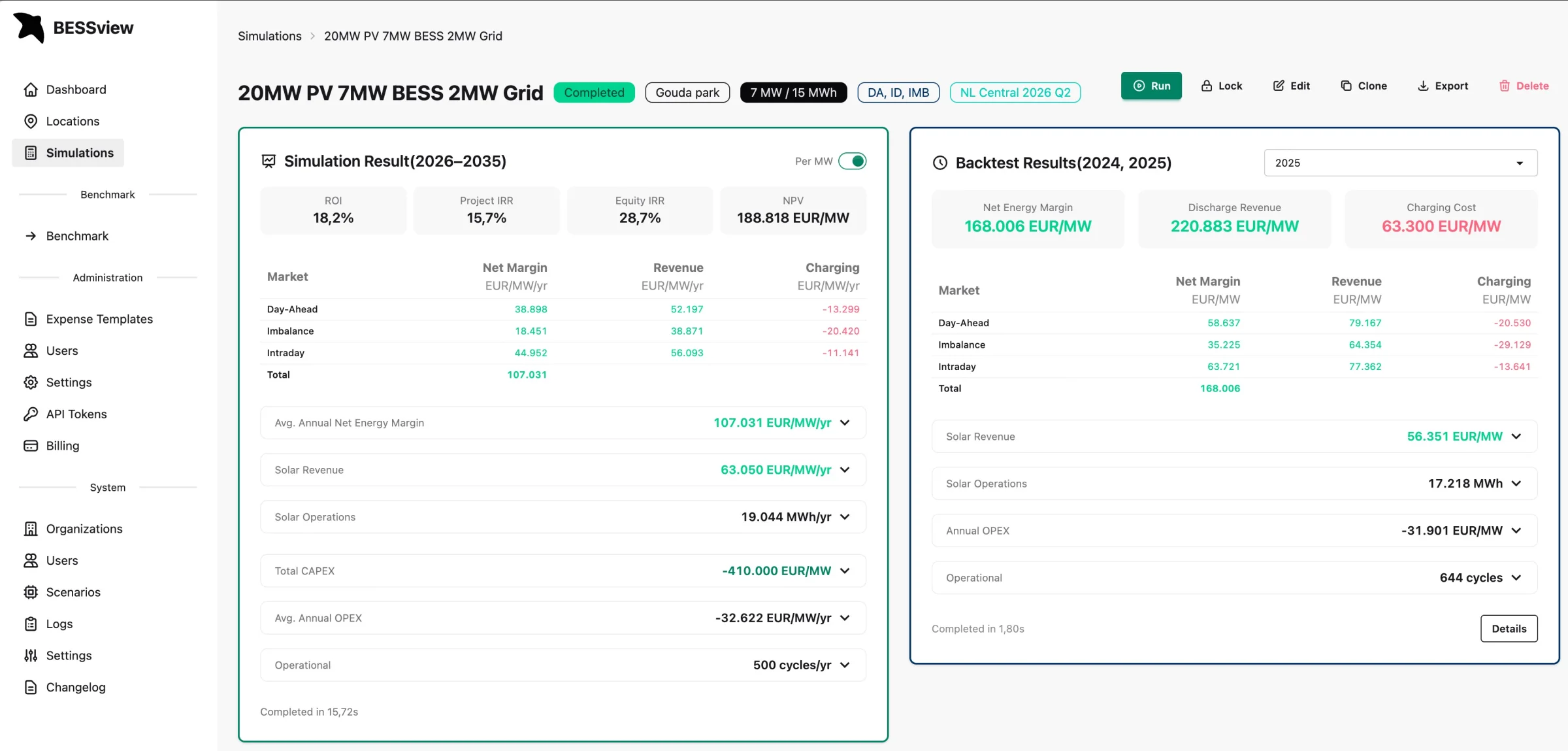
One asset, two runs: the ten-year forward simulation on the left, the 2025 backtest on the right. Same engine, same constraints.
See what the platform does
These are unedited screen recordings from BESSview.
Backtest against the markets that actually happened
BESSview runs your exact asset configuration against published historical prices, so you can see what it would have earned, and read that next to the forward-looking simulation on the same screen, in the same units.
- Simulation and backtest, one screen, per market
- Net margin, discharge revenue and charging cost split out
- Absolute euros or per MW, one toggle, for clean comparisons
- ROI, project IRR, equity IRR, NPV and cycles per year
Drill into every dispatch decision, every quarter-hour
If a result surprises you, you can check it. Open any day and see exactly when the battery charged, which market it discharged into, at what price, and what the state of charge was, alongside the market prices and reserve bids that drove the decision.
- Power and state of charge per market, per PTU
- aFRR up and down volumes and FCR capacity bids drawn per day
- Monthly revenue by market across the year, as a heatmap
- The underlying price curves, so any figure can be traced back
Every parameter is yours to set
Degradation curve, availability, round-trip efficiency, inverter limits, SDE++ category, curtailment behaviour at negative prices, foresight horizon, aFRR and FCR reserve headroom, CAPEX and OPEX templates, loan structures, discount rates, energy tax. Change any of them and rerun. A ten-year, quarter-hourly, multi-market run finishes in seconds.
- Guided setup: site, generation, grid, battery, economics, trading
- Reserve headroom for aFRR and FCR, as a share of battery duration
- Financing: equity, loans, interest, term, discount rate, energy tax
- Reusable CAPEX/OPEX templates, with items linked to battery size
Cashflow per year, every cost on its own line
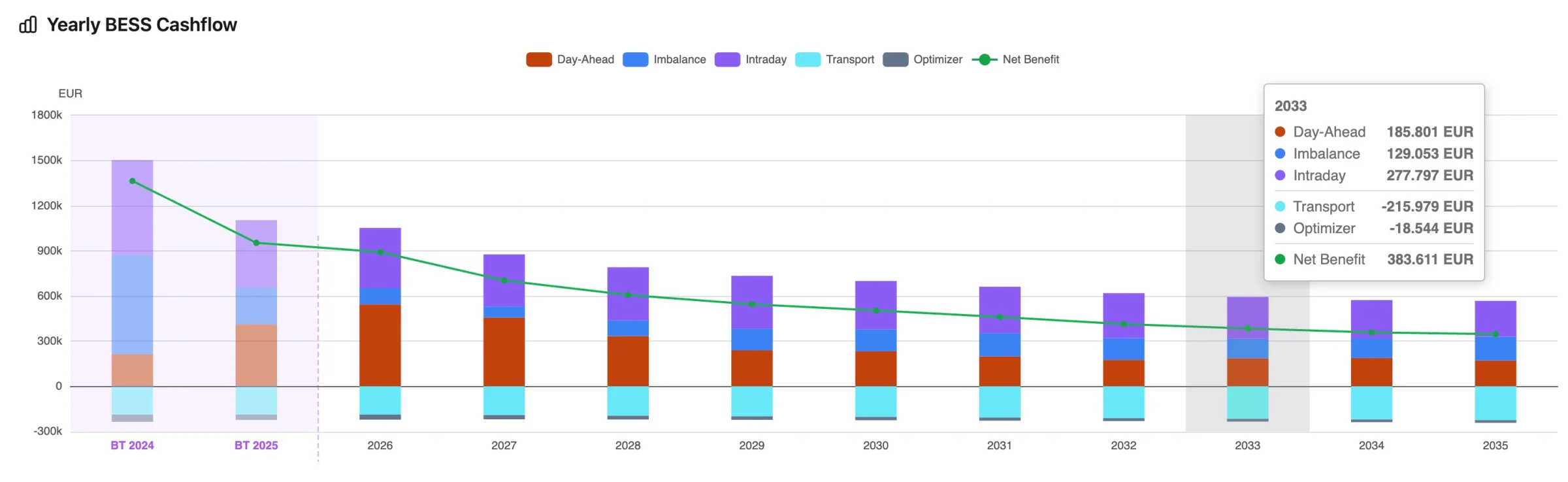
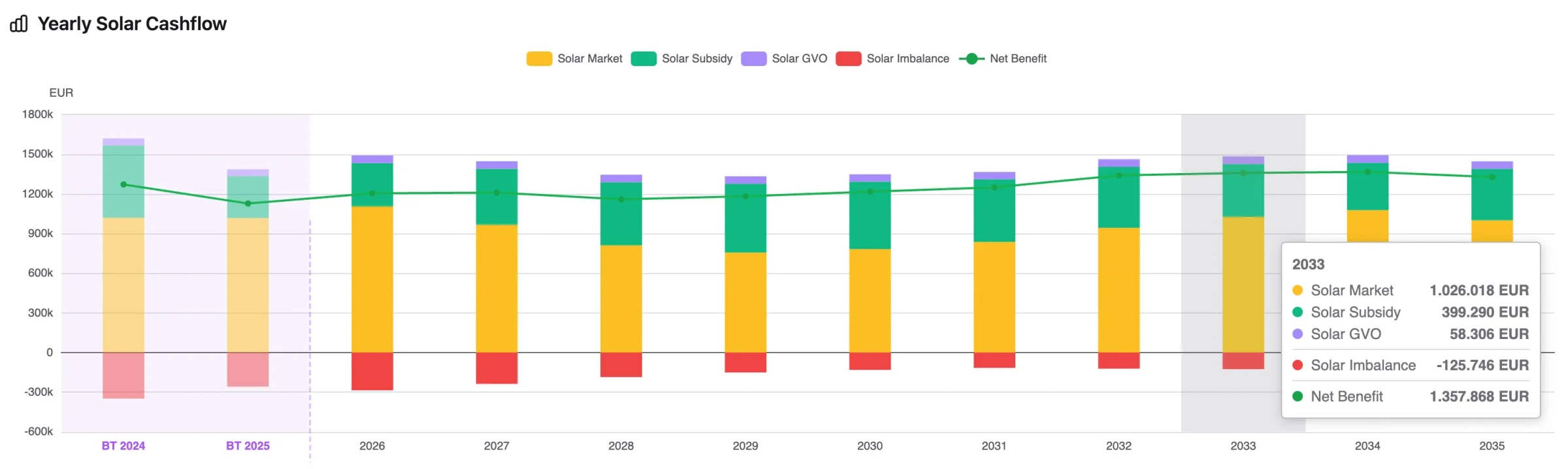
Year-by-year cashflow over the full project lifetime, with revenue split per market, degradation applied, cycles counted, and every cost itemized: transport standing charge, contracted power, kWmax peak, transported energy, optimizer fee, and OPEX broken out per line item rather than lumped into one number.
Backtest years sit on the same axis as the forecast years, so the step between what happened and what is projected is right there to see.
- Battery and renewable cashflows, separately and combined
- Solar market revenue, SDE++ subsidy, GvO certificates and imbalance cost
- PDF report, Excel workbook, and a populated project-finance model
- Lock a scenario to freeze it, or clone it to branch the assumptions
Model your real location, including solar, wind and the grid connection
Place your project on the map and describe it as it will actually be built: panel orientation and tilt, east-west or single orientation, inverter limits, turbine model and hub height, the site's own consumption profile, and the grid connection that all of it has to fit through.
- Map-based location setup with real coordinates
- PV detail: layout, azimuth, tilt, east-west, inverter limit
- Wind detail: turbine model, hub height, system loss, power-curve smoothing
- On-site consumption profiles for behind-the-meter sites
- Reuse locations across simulations and scenarios
Weather-based production profiles and grid restrictions
Generate PV and wind production profiles from ERA5 reanalysis weather for your exact coordinates, or upload measured or contracted profiles. Then add the connection constraints: a non-firm profile, and the monthly kWmax peak tariff.
- Location-specific profiles, interpolated to quarter-hours
- Non-firm and flexible connections (ATO, TDTR) as time blocks
- Ramp rate limits and renewable-first export priority
- kWmax optimization: the LP trades revenue against the monthly peak tariff
Scenario analysis, side by side
Battery size, connection capacity, market mix, price curve: the case moves with each of them. Which assumption it actually hangs on only shows up when the runs sit next to each other.
Compare up to five, against a baseline
Pick up to five completed simulations and read their headline financials, per-market revenue, cashflow and operational metrics in one table. Star one as the baseline and every other column becomes a delta against it, so a 2 MW connection versus a 5 MW one is a number rather than an argument.
A config-differences panel lists only the fields that actually differ (battery, strategy and markets, grid, economics, project, cost items), which is how you find out that two runs you thought were identical were not. Drag the columns into low, mid, high order and save the whole selection as a named set your organization can reload.
- Per-market revenue in €/yr, €/MW/yr, total or share of the stack
- Total project or battery-only cashflow, on one toggle
- Cycles, throughput, final state of health and curtailed energy
PDF report, methodology included
Financial and operational results, the methodology behind them, the BirdCurve forecast used, and the stated assumptions and limitations, in one document. Toggle CAPEX, OPEX and the derived NPV, IRR and payback out of it when you want to share a revenue-only view.
Excel, and a real financial model
Export the workbook and drop the numbers into your own model, or generate a populated project-finance model from one or more completed simulations and skip the retyping step where mistakes are made. The financial model is an Enterprise feature.
Locked scenarios and an audit trail
Lock the scenario you decided on so it cannot drift, clone it to test the next question, and keep the audit trail. Everything lives in your own organization, with roles, access control and an API for your own tooling.
Built to be checked
Every figure drills down to the dispatch and price data it came from, and every backtest runs on published prices you can look up.
Backtested on published prices
Any simulation can be re-run against the historical prices for the same period and read side by side.
Transparent to the quarter-hour
Drill from annual IRR all the way down to a single 15-minute PTU of dispatch, with nothing hidden behind an aggregate.
Built by energy professionals
Developed by the Birdview Energy team, who advise on BESS feasibility, grid connections and project financing every day. Meet the team.
Your data stays yours
Projects live in your own organization's account with user management and access control. Your pipeline is not our marketing material.
What BESSview does not model
This list ships inside every report, and it is on this page for the same reason: you will find these limits eventually, and it is better that you find them from us. Each one leans conservative, so the reported revenue is a floor rather than a mid-case.
- Outages. The battery is assumed available whenever the schedule wants it, so plant downtime is yours to deduct.
- Sub-PTU dynamics. Imbalance settles at the 15-minute PTU; what happens inside it is not resolved.
- Order-book depth. Bid-ask spread, exchange and clearing fees are absorbed into one optimizer fee, visible in the OPEX breakdown.
- Your own price impact. Reserve and capacity clearing prices are exogenous: your battery bidding in does not move them.
- Cell-level variation. Degradation is deterministic, so warranty triggers and cell-to-cell spread are not represented.
- Market redesign. Curves assume today's market structure; a capacity market or a gate-closure change would move them.
Forecast-side assumptions are set out the same way, with their direction of bias, in the BirdCurve method and in the report appendix.
Plans
Access is priced per project window, not per seat per year. Start free, and upgrade when the project asks for more.
Explore
First look
Limited access
- Day-ahead, intraday and imbalance
- Central price curve
- 5 simulation runs, up to 3 project years
- Template locations, standard degradation and grid fees
- Cashflow overview
Basic
Screening, go / no-go
1 month access
Everything in Explore, plus:
- aFRR and FCR markets
- 10 runs, 1 custom location
- All BESS and grid parameters, all DSO standard fees
- Generated PV profile, configurable CAPEX/OPEX
- Full Excel and PDF report
Credited if you upgrade to Pro
Get BasicPro
Full project case
6 months access
Everything in Basic, plus:
- High, Central and Low price curves
- 50 simulation runs
- Upload your own degradation curve and PV/wind data
- Tailor-made DSO/TSO grid fees
- Full sensitivity suite and financing metrics
- Calls and support hours
Enterprise
Full platform access
Custom agreement
Everything in Pro, plus:
- Unlimited runs and locations
- Upload your own price curves
- Populated project-finance model
- Dedicated support and custom contract terms
Prices exclude VAT. A run is one full simulation of a configured scenario; re-reading, comparing and exporting results costs nothing. Need more seats, a longer window, or several projects at once? Ask us.
Where BESSview sits
A battery business case has three separate questions in it: what will prices do, how restricted is the connection, and how well is the asset actually traded. Each has its own tool, and they share their inputs.
BirdCurve
The price curves BESSview runs on: 15-minute forward curves to 2050 in Low, Central and High, from a documented fundamental model rather than a licensed black box.
See how the curves are built →BirdFlow
For a non-firm connection, BirdFlow models the Dutch transmission grid to tell you how many hours you would actually be restricted. BESSview turns those hours into euros.
See the grid model →Benchmarking
Once the asset is running, the same dispatch engine produces the achievable-revenue reference your optimizer is measured against, monthly, while the contract still has time to run.
See the benchmark method →Frequently asked questions
Straight answers, before you sign up.
Still have questions? Contact us. We answer ourselves, not a chatbot.
Who it is for
Whether you are sizing a new project, structuring a PPA, or adding a battery to a site that already generates or consumes, the question is what the battery will actually earn on your connection.
PV & BESS developers
Size the battery against the connection you were actually offered, test non-firm capacity (ATO/TDTR) scenarios, include SDE++ and curtailment, and compare battery sizes side by side before ordering hardware.
- Standalone, solar+storage and wind+storage
- Non-firm and flexible connections, plus the kWmax peak tariff
- IRR, NPV, payback and loan structures built in
Traders & PPA providers
Quantify what a battery is worth under your trading strategy before you structure the PPA or tolling agreement. Backtest revenue stacking across all five markets on real published prices.
- Cross-market stacking every quarter-hour
- aFRR and FCR with SoC reserves and 1 MW bid floors
- Trading constraints and foresight horizon you control
Sites behind the meter
Add a battery to a site that already has solar, wind or its own consumption on one connection. Load your consumption profile, size the battery against the connection and the kWmax peak tariff, and see what the battery adds to the site as a whole.
- On-site consumption profile on the same connection
- Zero-cost solar-to-battery transfer in negative price hours
- SDE++ delayed feed-in via the battery, modelled to the subsidy rules
How the numbers are made
The dispatch optimizer, the foresight window, the degradation model and the price curves behind every figure on this page.
Rolling-horizon dispatch. The optimizer only ever commits decisions it could have made with the information available at the time.
The foresight assumption
Solve a whole year of prices in one go and a battery looks brilliant: it charges at the annual minimum and discharges at the annual maximum. That number is a physics limit, not a business case, yet it is the basis of many BESS revenue projections.
BESSview does not allow it. Each linear program sees a foresight horizon of a few days, commits only its first day, and carries that decision into the next window, which opens on prices it did not know about. Set the horizon yourself in the trading step and see how the revenue responds.
Across the runs we have measured, rolling-horizon dispatch lands at 85 to 95% of the perfect-foresight ceiling. We report the lower number and tell you what the ceiling was, because the gap is the part of the business case that depends on how good your trader really is.
Rolling LP
What we reportOverlapping windows, limited foresight, decisions locked before the next window opens. Degradation and state of charge carry across windows, so the asset ages inside the simulation.
Every headline figure on your report (IRR, NPV, cashflow, revenue per market) comes from this run.
Full LP
Upper bound onlyOne linear program over the entire horizon with complete knowledge of every future price. Useful as a ceiling to measure against, and available to run.
Not achievable in practice, so it is never presented as a projection.
Quarters, not hours
Dispatch, settlement and reporting all run on the 15-minute Programme Time Unit the Dutch market actually settles on. Hourly averages hide exactly the volatility a battery is paid for.
Deterministic dispatch
Dispatch is a linear program solved by HiGHS, the open-source simplex and interior-point solver. It is exact within numerical tolerance: no Monte Carlo, no heuristic. Run it twice on the same inputs and you get the same schedule.
Degradation inside the loop
Calendar and cycle ageing are tracked between windows, including the energy cycled through aFRR and FCR activations. The optimizer sees today's usable capacity, so revenue declines as the asset ages instead of being discounted afterwards.
Simulation and backtest
A simulation runs your asset forward on BirdCurve scenarios. A backtest runs the identical asset on prices that were actually published. Same engine, same constraints, both on one screen, so you can see how the forecast relates to what markets have done.
The curves are ours too, and they are documented
BESSview does not buy a forward curve and hope. Its price scenarios come from BirdCurve NL, Birdview Energy's own fundamental forecasting system: a gradient-boosted ensemble trained on gas marginal cost, residual load, scarcity, cross-border flows and weather, with a documented feature set rather than a licence agreement that forbids you from asking.
Low, Central and High scenarios ship with the platform and are refreshed every quarter. Enterprise accounts upload their own curves, and every report states which curve produced which number.
How BirdCurve is built and validated →| Market | Resolution |
|---|---|
| Day-ahead | 15 minutes |
| Intraday continuous (ID3, 3-hour VWAP) | 15 minutes |
| Imbalance, long and short | 15 minutes |
| aFRR energy, up and down | 15 minutes |
| aFRR capacity | 4-hour blocks |
| FCR capacity | 4-hour blocks |
Netherlands, 2018 to 2050. Intraday is priced at the ID3 index: the volume-weighted average price (VWAP) of continuous trades in the last three hours before each 15-minute delivery period. All five markets are cross-optimized in a single dispatch problem, not simulated separately and added up.
See your project's real numbers
Explore is free, so run your own project through it. Or request a demo and we do the first run together, on your project.
Five simulation runs, no card, no call. See what each plan includes.